
Core Product Tutorials
How to Create Custom Campaigns in Axy.digital
Axy.digital does not only generate weekly evergreen campaigns from market signals. You can also create custom campaigns from your own inputs — product updates, partnership announcements, case studies, client feedback, articles, LinkedIn posts, tweets, drafts, or content ideas.
On this page
Axy.digital does not only generate weekly evergreen campaigns from market signals.
You can also create custom campaigns from your own inputs, including product updates, partnership announcements, case studies, client feedback, articles, LinkedIn posts, tweets, drafts, or content ideas.
This means your marketing engine can support your real business milestones, not just ongoing content.
Use custom campaigns when you already know what you want to promote, but you want Axy.digital to turn it into a full suite of channel-ready content.
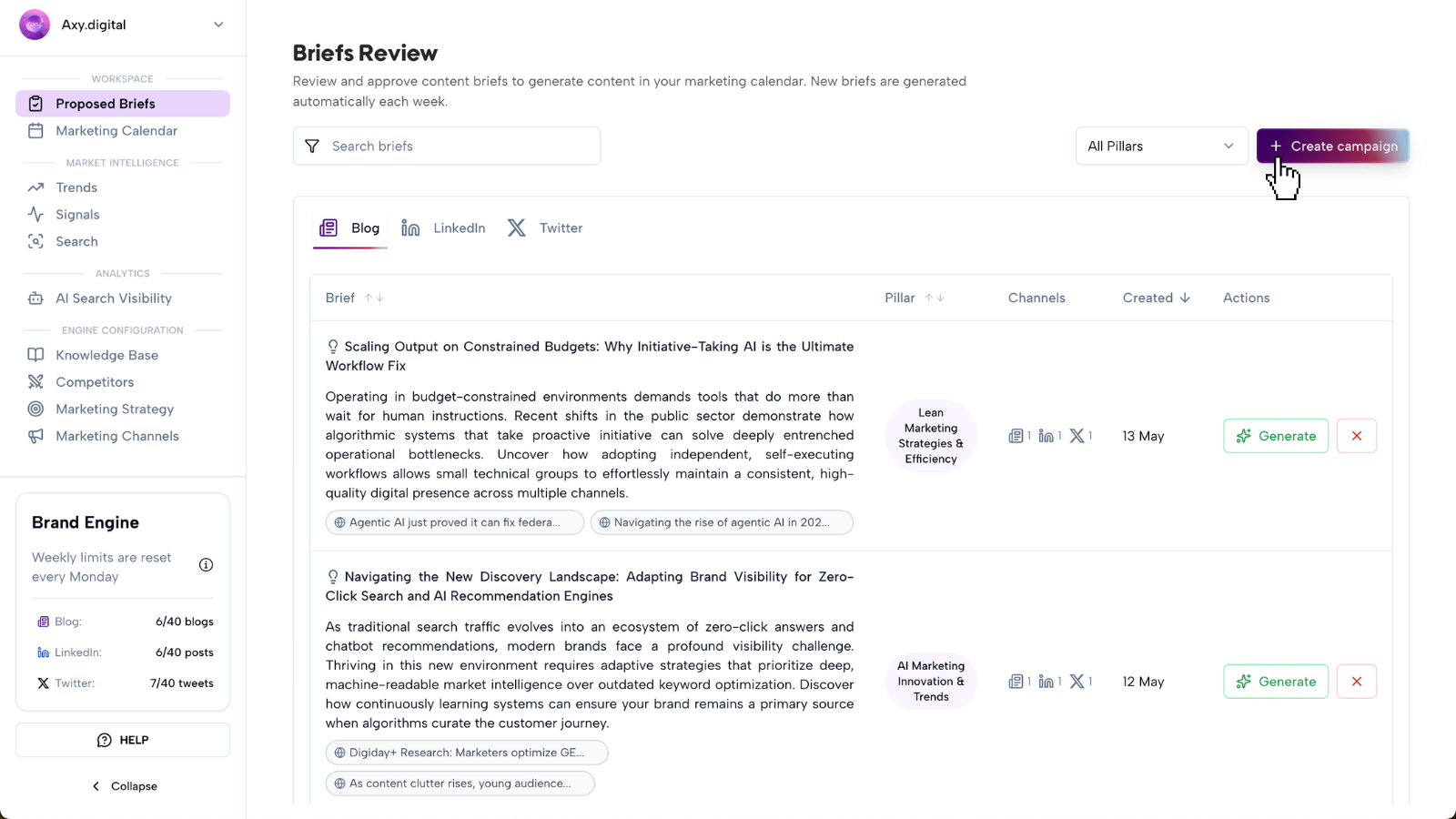
What you can create with custom campaigns
You can use custom campaigns for:
- Product launches
- Partnership announcements
- Case studies
- Customer stories
- Founder announcements
- Feature releases
- Event recaps
- Funding announcements
- Thought leadership ideas
- Blog drafts
- Social commentary
- Repurposed articles
- Client wins
- New market entries
- Webinar or podcast recaps
Axy.digital will use your input, approved strategy, channel plans, website index, knowledge base, and channel guidelines to generate content that fits your brand.
Before you start
Make sure you have:
- Completed onboarding
- Approved your marketing strategy
- Reviewed your channel plans
- Configured your GEO, LinkedIn, and X guidelines
- Added relevant resources to your knowledge base
- Added your website so Axy.digital can recommend internal links
Your custom campaigns will be stronger when your strategy and channel guidelines are up to date.
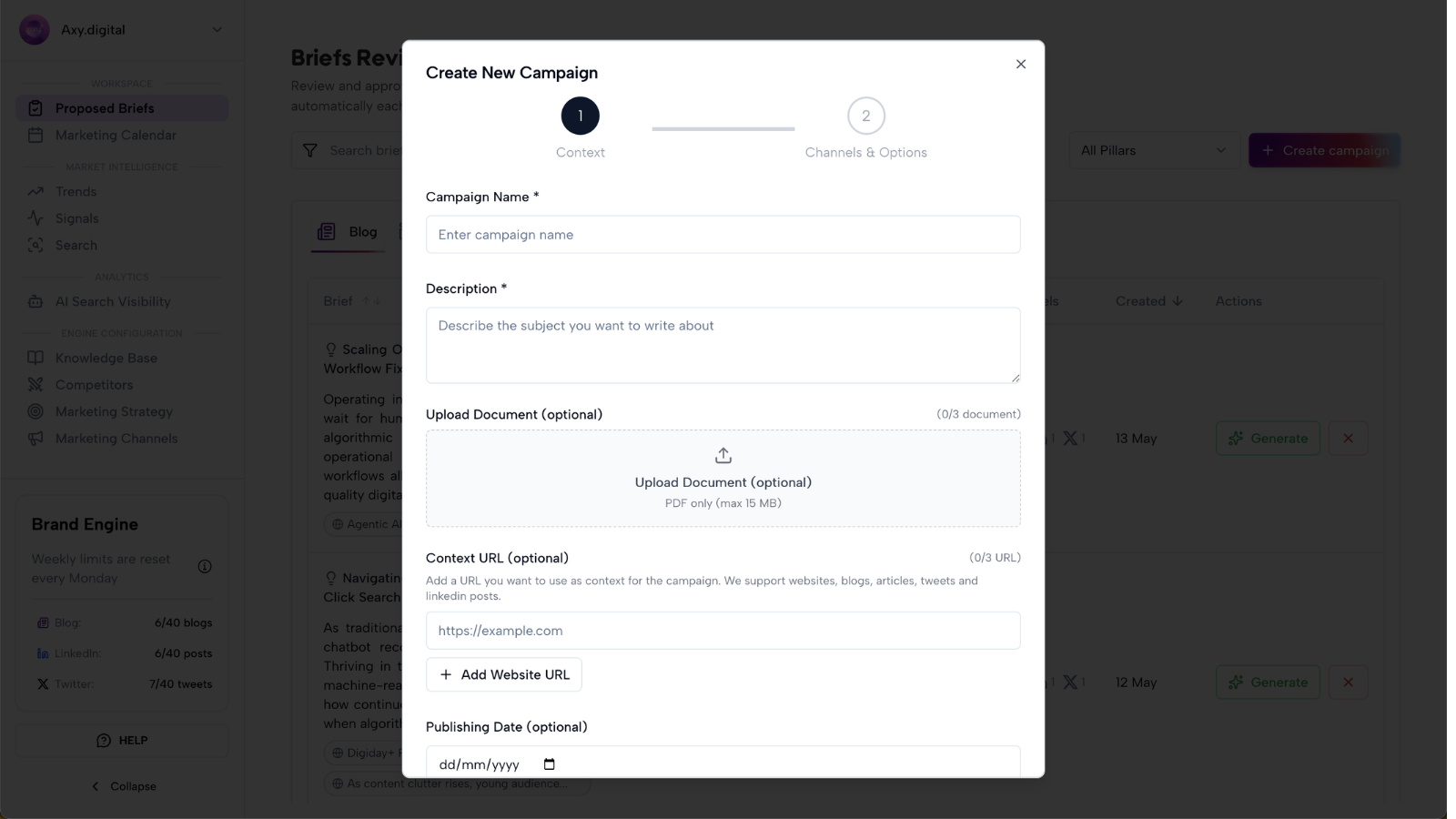
Step 1: Open custom campaign creation
From your workspace, open the campaign creation area and choose Custom Campaign.
This is where you can give Axy.digital your own input instead of choosing from a proposed brief.
Use this when you want to create content around a specific milestone, asset, announcement, or idea.
Step 2: Choose your campaign input
Start by adding the source material for your campaign.
You can create a custom campaign from several types of input.
Upload a product brief
Use this when you are launching a new product, feature, integration, or service.
Axy.digital can turn the brief into:
- Product launch announcement
- GEO article
- LinkedIn posts
- X posts or threads
- Founder commentary
- Product education content
- Supporting campaign angles
Example: Upload a product brief → Get a full product launch campaign.
Add client feedback and a website
Use this when you want to create a case study or customer story.
You can add:
- Client feedback
- Customer quotes
- Results
- Screenshots
- Client website
- Project context
- Before/after details
Axy.digital can turn this into:
- Polished case study
- LinkedIn case study post
- X thread
- Customer proof snippets
- Sales enablement copy
- Campaign CTA
Example: Drop in client feedback + website → Get a polished case study.
Link a LinkedIn post, tweet, or article
Use this when you find a post or article you want to respond to, build on, or reference.
Axy.digital can generate:
- On-brand commentary
- Founder-led response
- LinkedIn post
- X post
- X thread
- Contrarian angle
- Educational breakdown
- Campaign idea
Example: Link a LinkedIn post, tweet, or article you like → Generate on-brand commentary.
Upload a draft
Use this when you have a half-finished blog, post, announcement, or idea that needs refinement.
Axy.digital can help:
- Complete the draft
- Improve structure
- Strengthen the hook
- Adapt the tone
- Add CTAs
- Turn it into multiple channel assets
- Align it with your strategy and channel plans
Example: Upload that half-baked draft → Let Axy.digital take it over the finish line.
Enter your own idea
Use this when you have a campaign idea but no full brief yet.
You can write a short description such as:
“We want to announce our new AI Visibility Analytics dashboard and explain why AI search visibility is becoming a new organic growth channel.”
Axy.digital will turn the idea into a structured campaign brief before generating assets.
Step 3: Add campaign context
After adding your input, give Axy.digital any extra context that matters.
Useful context includes:
- What is being announced
- Why it matters
- Who the audience is
- What outcome you want
- Which product or feature this supports
- Which customer segment this targets
- Whether the tone should be educational, bold, technical, founder-led, or product-led
- Which channels you want to generate for
- Whether there are claims, stats, or customer quotes to include
- Any details to avoid
You do not need to write a perfect brief. Axy.digital will structure the campaign for you.
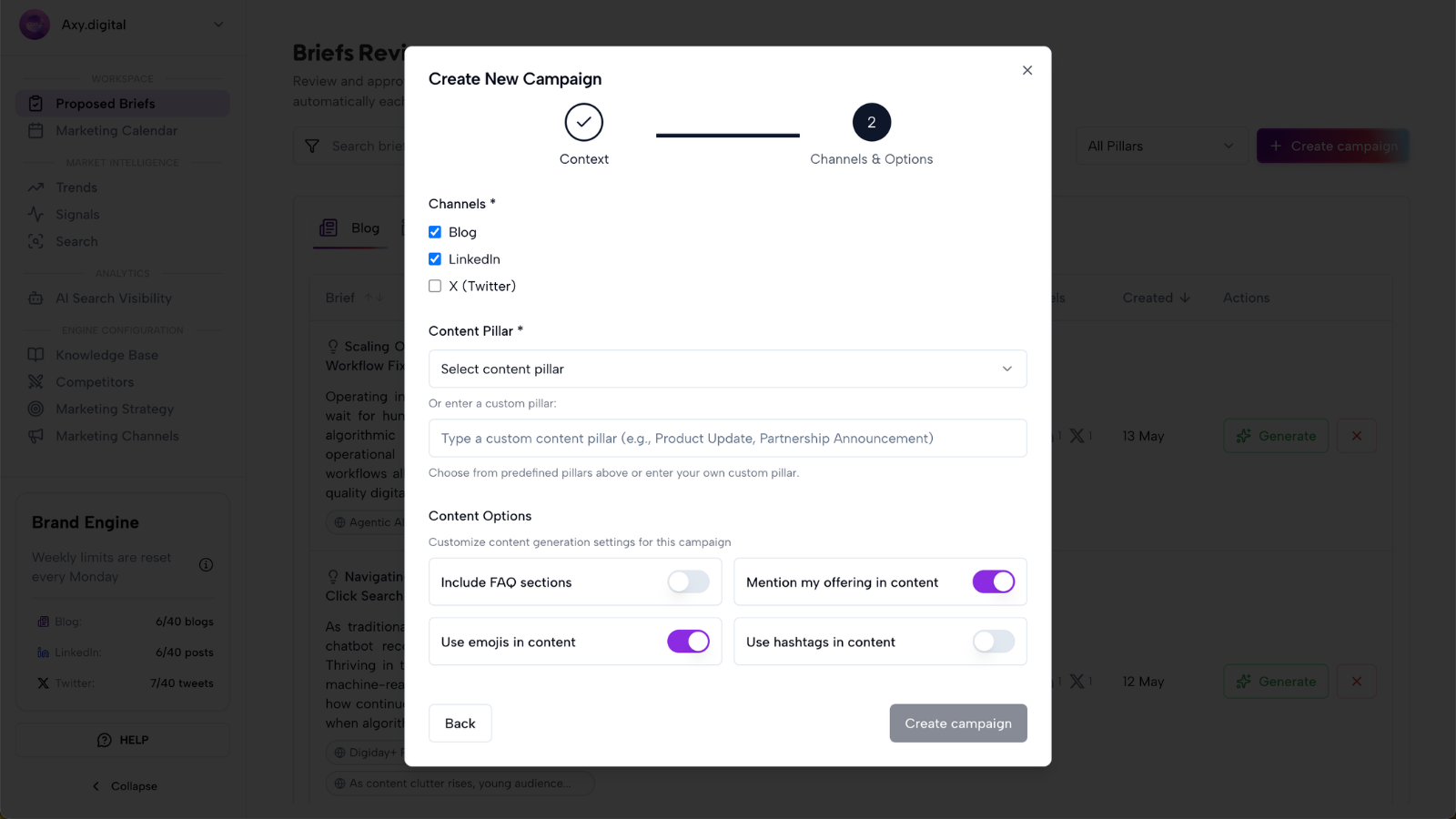
Step 4: Choose the platform and add custom guidelines
After adding your input and context, choose which platform(s) Axy.digital should generate content for, and add any custom guidelines for this campaign.
Choose the platform
Select one or more platforms for this campaign:
- Blog (GEO / SEO article)
- LinkedIn (posts and founder-led commentary)
- X (posts and threads)
Axy.digital adapts tone, structure, and length automatically per platform, using your existing channel plan and guidelines.
Add custom guidelines (optional)
Add any guidelines that should apply to this specific campaign, such as:
- Tone or voice adjustments (more technical, more founder-led, more playful)
- Specific phrases, hooks, or CTAs to include
- Words, claims, or topics to avoid
- Required mentions (product name, customer, partner, event)
- Formatting preferences (thread length, post length, use of stats)
- Links that must be included
These guidelines apply on top of your standing channel guidelines and only affect this campaign.
Step 5: Click Generate
Once the brief looks right, click Generate.
Axy.digital will automatically create the right content suite based on the brief, your strategy, and your channel guidelines.
Depending on the campaign, Axy.digital may generate:
- GEO article
- SEO article
- AEO answer content
- LinkedIn posts
- X posts
- X threads
- Launch announcement copy
- Case study copy
- Founder commentary
- Product education content
- Suggested CTAs
- Internal links
- Follow-up campaign ideas
Axy.digital automatically adapts the content for each channel, so you do not need to manually decide the format.
Step 6: Review the generated content
Review each generated asset before approving it.
Check:
- Is the content accurate?
- Does it reflect the source material?
- Does it match your brand voice?
- Does it follow the right channel guidelines?
- Are customer quotes or claims used correctly?
- Are product details correct?
- Is the CTA appropriate?
- Are internal links relevant?
- Is the content specific enough?
- Does it avoid words or phrases you do not want to use?
For announcements and case studies, pay extra attention to accuracy and approval.
If you are referencing a customer, partner, or third-party post, make sure the content is appropriate to publish.
FAQ
how are custom campaigns different from proposed briefs?
Proposed Briefs are generated by Axy.digital based on market intelligence, AI visibility gaps, search demand, competitor updates, social trends, and news headlines.
Custom Campaigns start from your own input.
Use Proposed Briefs when you want Axy.digital to suggest what to act on.
Use Custom Campaigns when you already have a milestone, idea, asset, draft, announcement, or source you want to turn into a campaign.
do I need to write a full brief?
No.
You can give Axy.digital a rough input, draft, link, customer quote, product note, or idea.
Axy.digital will turn it into a structured campaign brief before generating the full content suite.
can Axy.digital create a case study from client feedback?
Yes.
You can add client feedback, results, project notes, and the client’s website. Axy.digital can then generate a polished case study and related social content.
For best results, include:
- Who the client is
- What problem they had
- What you helped them do
- What changed
- Any measurable outcomes
- Customer quotes
- Relevant links or screenshots
- Any claims that need approval
can I use someone else’s post or article as inspiration?
Yes.
You can link a LinkedIn post, tweet, or article you like and ask Axy.digital to generate on-brand commentary.
Use this to respond to market conversations, add your point of view, or turn inspiration into original content.
Do not copy the original source. Use it as context for your own commentary.
can I upload a rough draft?
Yes.
You can upload a half-baked draft and let Axy.digital improve it, complete it, restructure it, or turn it into a full campaign.
This is useful when you have the idea but do not want to spend time polishing, formatting, or adapting it for multiple channels.
Best practices
Give Axy.digital enough context
A short input can work, but campaigns are stronger when you include the audience, goal, key details, and desired outcome.
Use custom campaigns for milestones
Product launches, partnerships, customer wins, case studies, and events deserve dedicated campaigns.
Review factual details carefully
For launches, partnerships, and case studies, check names, claims, dates, quotes, and outcomes before publishing.
Let Axy.digital adapt the format
You do not need to manually decide every asset type. Axy.digital will generate the right content suite based on the campaign brief and channel guidelines.
Turn one milestone into multiple assets
A product brief, customer quote, or article can become a GEO article, LinkedIn post, X thread, and follow-up campaign.