
Core Product Tutorials
How Axy.digital Generates Campaigns
Axy.digital does not wait for you to start from a blank page. Once your workspace is set up, Axy.digital continuously uses your market data, AI visibility insights, competitors, strategy, channel plans, and website context to suggest campaign briefs inside your workspace. You can review these campaign briefs under Proposed Briefs and click Generate on the campaigns you want to create. Axy.digital then generates channel-ready content and adds it to your marketing calendar.
On this page
- How campaign generation works
- Step 1: Axy.digital detects campaign opportunities
- Step 2: Axy.digital turns signals into proposed briefs
- Step 3: Review proposed briefs
- Step 4: Click Generate on campaigns you like
- Step 5: Content is added to the marketing calendar
- Step 6: Review the generated content
- Step 7: Approve, schedule, or publish
- FAQ
- Best practices
How campaign generation works
Axy.digital uses live and contextual data to identify campaign opportunities. These may come from:
- A market intelligence signal
- An AI visibility gap
- A search demand opportunity
- A competitor update
- A social trend
- A news headline
Each signal is matched against your approved marketing strategy, channel plans, website index, competitors, and content guidelines. This means campaign ideas are not generic. They are suggested because Axy.digital has identified a relevant opportunity for your business.
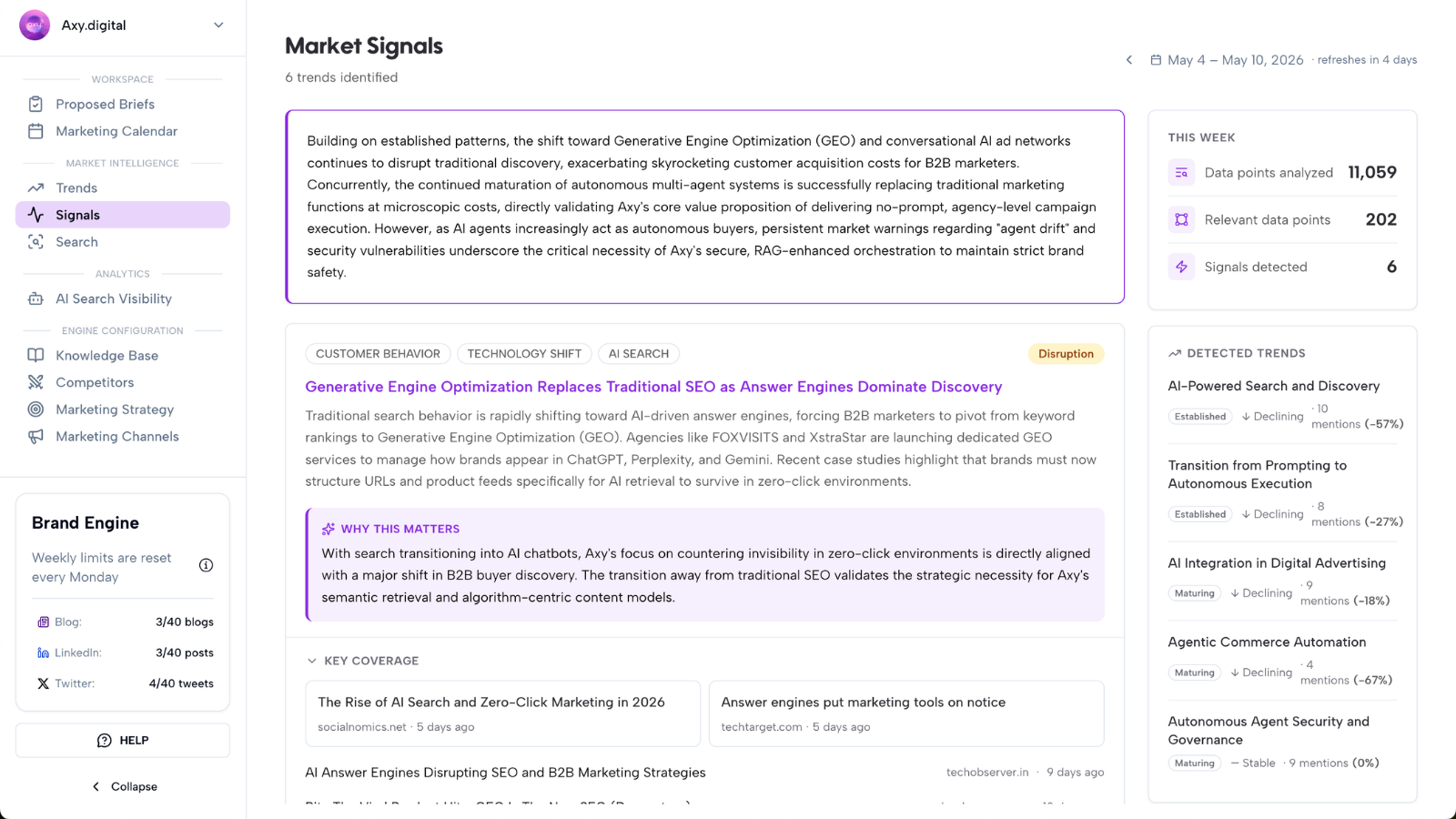
Step 1: Axy.digital detects campaign opportunities
Axy.digital continuously looks for signals that may be worth turning into campaigns. These signals can include:
Market intelligence signals
Trends, narratives, customer questions, or industry shifts gaining relevance in your market. Example: “AI search visibility is becoming a priority for B2B SaaS teams.”
AI visibility gaps
Prompts where your brand is missing, under-cited, or being outranked by competitors in AI-generated answers. Example: “Best AI marketing tools for startups.”
Search demand opportunities
Keywords, prompts, or questions that show customers are actively looking for answers. Example: “How to improve AI search visibility.”
Competitor updates
New pages, product launches, positioning shifts, content campaigns, or visibility changes from competitors. Example: “A competitor is ranking for comparison keywords in your category.”
Social trends
Topics, debates, or formats gaining traction across LinkedIn, X, or other relevant social channels. Example: “Founders are discussing whether agencies are becoming obsolete in the AI era.”
News headlines
Timely industry news, regulation changes, product launches, funding announcements, or market events. Example: “A new regulation is changing how your target customers think about compliance.”
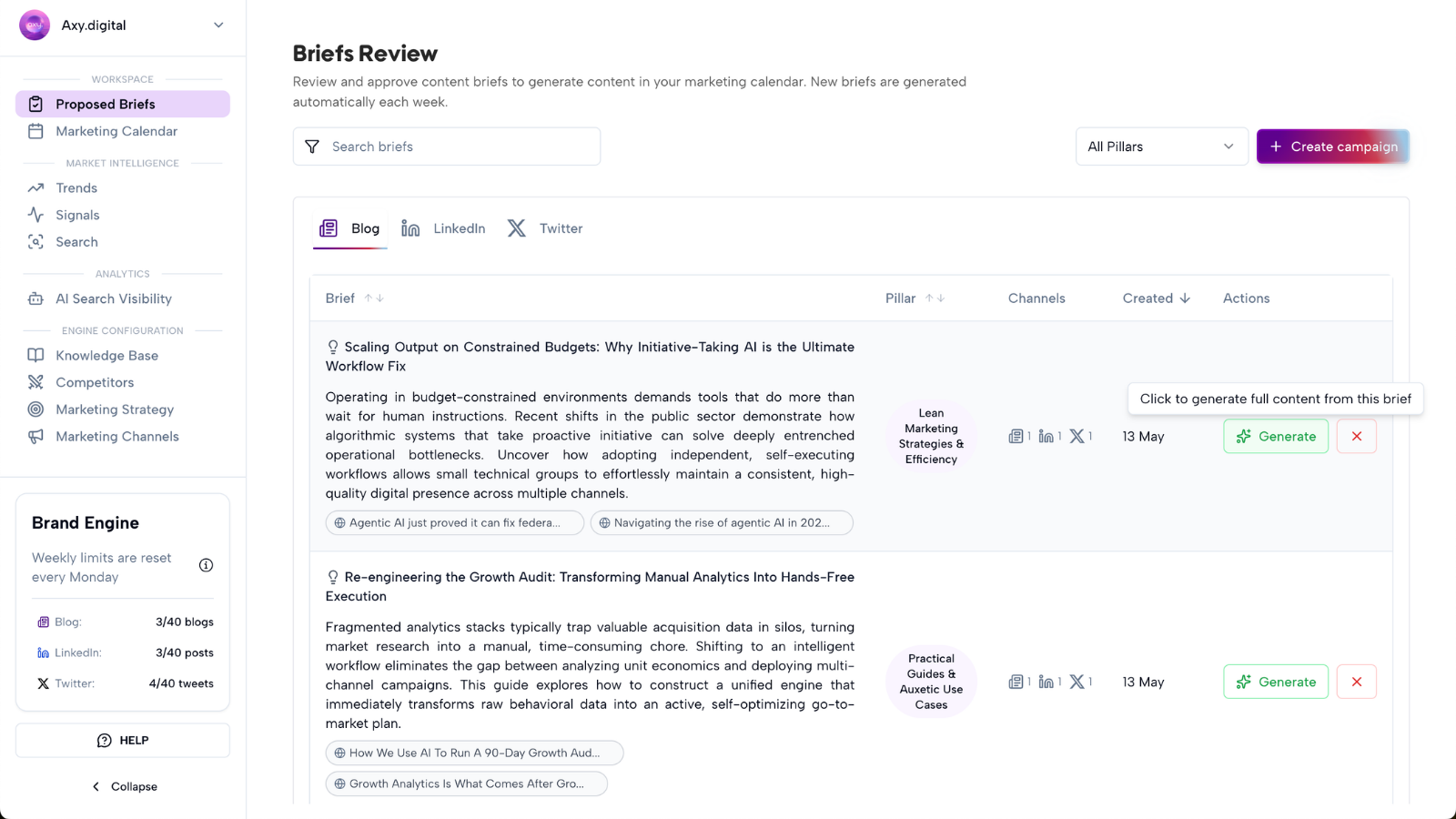
Step 2: Axy.digital turns signals into proposed briefs
When Axy.digital identifies a relevant opportunity, it creates a campaign brief inside your workspace. You can find these in: Workspace → Proposed Briefs.
Each proposed brief gives you a quick view of the campaign idea before generating content. A brief may include:
- Campaign topic
- Source signal
- Target audience
- Recommended channel
- Suggested angle
- Why this campaign matters
- Relevant prompt or search opportunity
- Competitor context
- Suggested CTA
- Internal link opportunities
- Channel-specific format
These briefs are designed to help you quickly decide which campaigns are worth generating.
Step 3: Review proposed briefs
Open Proposed Briefs and review the campaigns Axy.digital has suggested. When reviewing a brief, ask:
- Is this relevant to our audience?
- Does this align with our current strategy?
- Is the timing right?
- Does this support a product, use case, or market narrative we want to own?
- Is this useful for GEO, LinkedIn, X, or multiple channels?
- Does this help us respond to a competitor, trend, or AI visibility gap?
You do not need to build the campaign yourself. The brief already contains the strategic direction. Your job is to choose which opportunities you want Axy.digital to generate.
Step 4: Click Generate on campaigns you like
When you find a proposed brief you want to use, click Generate. Axy.digital will generate content based on:
- The campaign brief
- Your approved marketing strategy
- Your channel-specific plans
- Your channel guidelines
- Your brand voice
- Your competitors
- Your knowledge base
- Your website index
- Relevant market signals
- Relevant AI visibility or search data
The generated campaign is already optimized for the selected channel. For example: GEO campaigns are structured for search, AI discovery, direct answers, FAQs, and internal links. LinkedIn campaigns are aligned with your LinkedIn voice, post length, content pillars, and thought leadership style. X campaigns are aligned with your X style, tone, format, thread preferences, and commentary guidelines.
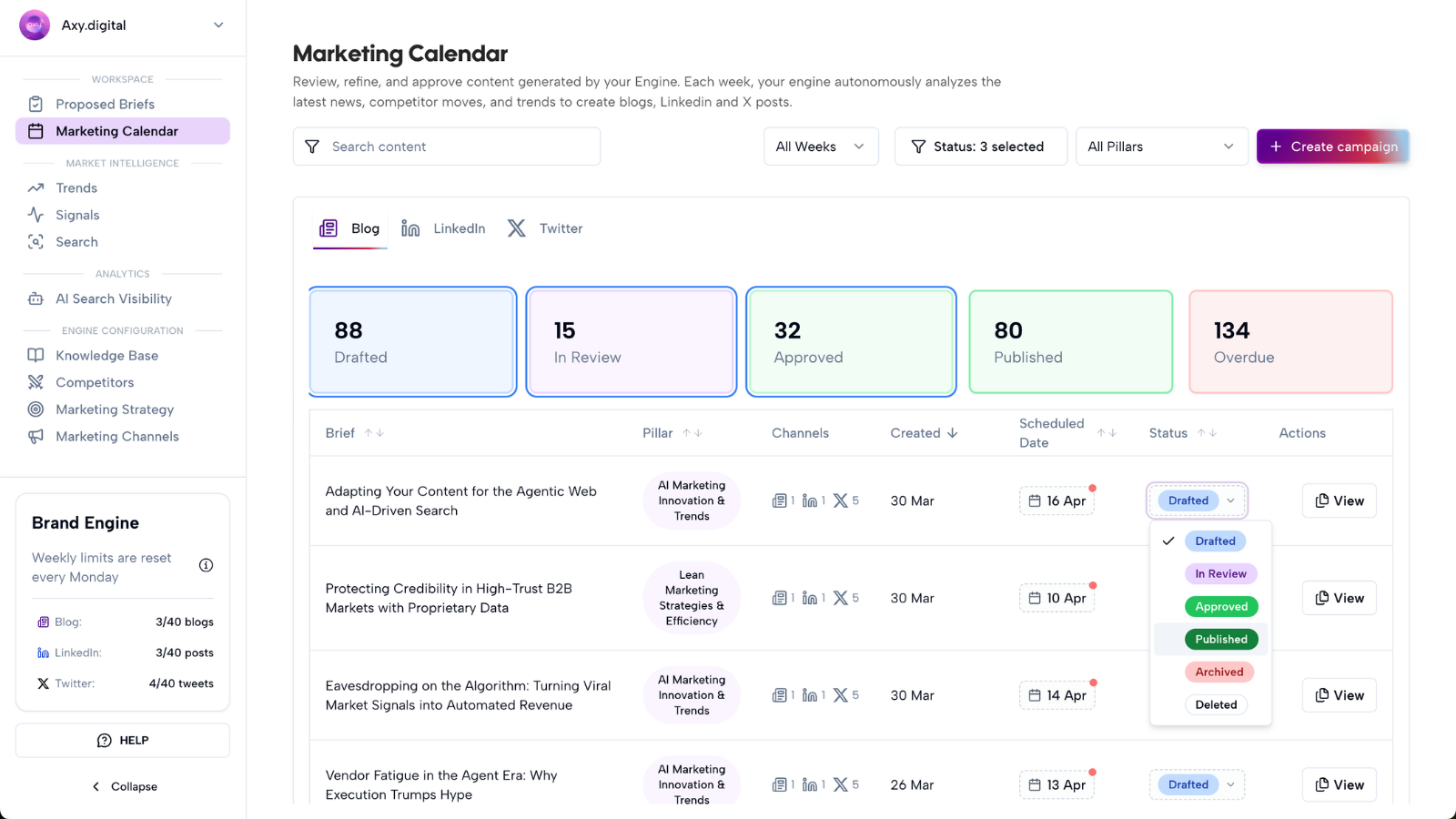
Step 5: Content is added to the marketing calendar
Once a campaign is generated, the content is populated in your Marketing Calendar. The calendar helps you see what is ready to publish across channels. Depending on your campaign, the calendar may show:
- GEO articles
- LinkedIn posts
- X posts
- X threads
- Scheduled campaign assets
- Draft content
- Approved content
- Channel-specific publication dates
This gives you a central view of your upcoming marketing execution. Instead of managing campaigns across scattered docs, spreadsheets, and social tools, you can see your generated content in one place.
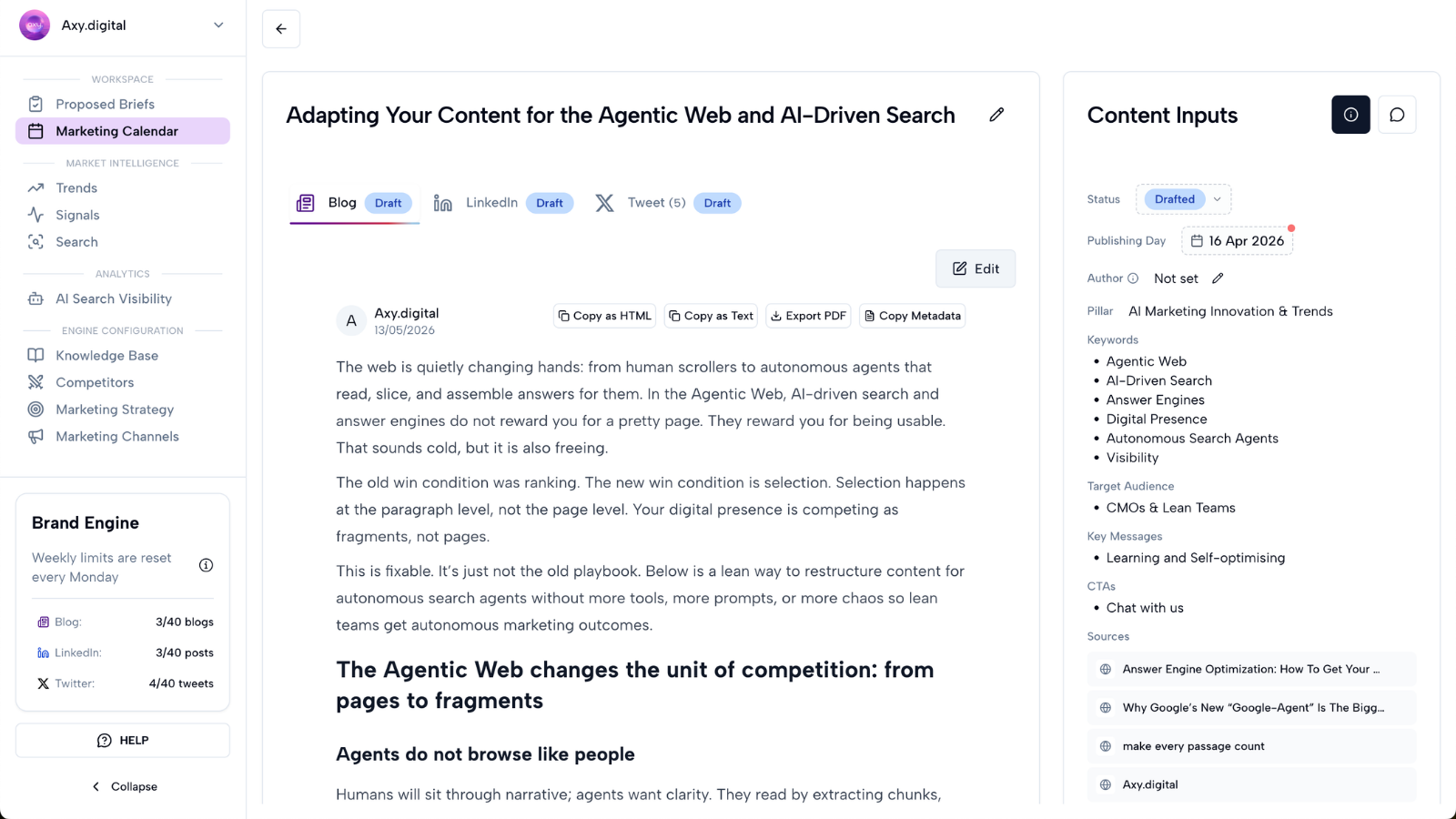
Step 6: Review the generated content
After you click Generate, Axy.digital creates the campaign content. Depending on the brief, this may include:
- GEO article
- AEO answer content
- SEO article
- LinkedIn post
- LinkedIn post variations
- X post
- X thread
- Campaign CTA
- Suggested internal links
- Supporting angles
Review the generated content before publishing. Check:
- Is the content accurate?
- Is the angle strong?
- Does it match your strategy?
- Does it follow the channel plan?
- Does it follow your channel guidelines?
- Are the internal links relevant?
- Is the CTA correct?
- Does it sound like your brand?
You can edit the content before approving it.
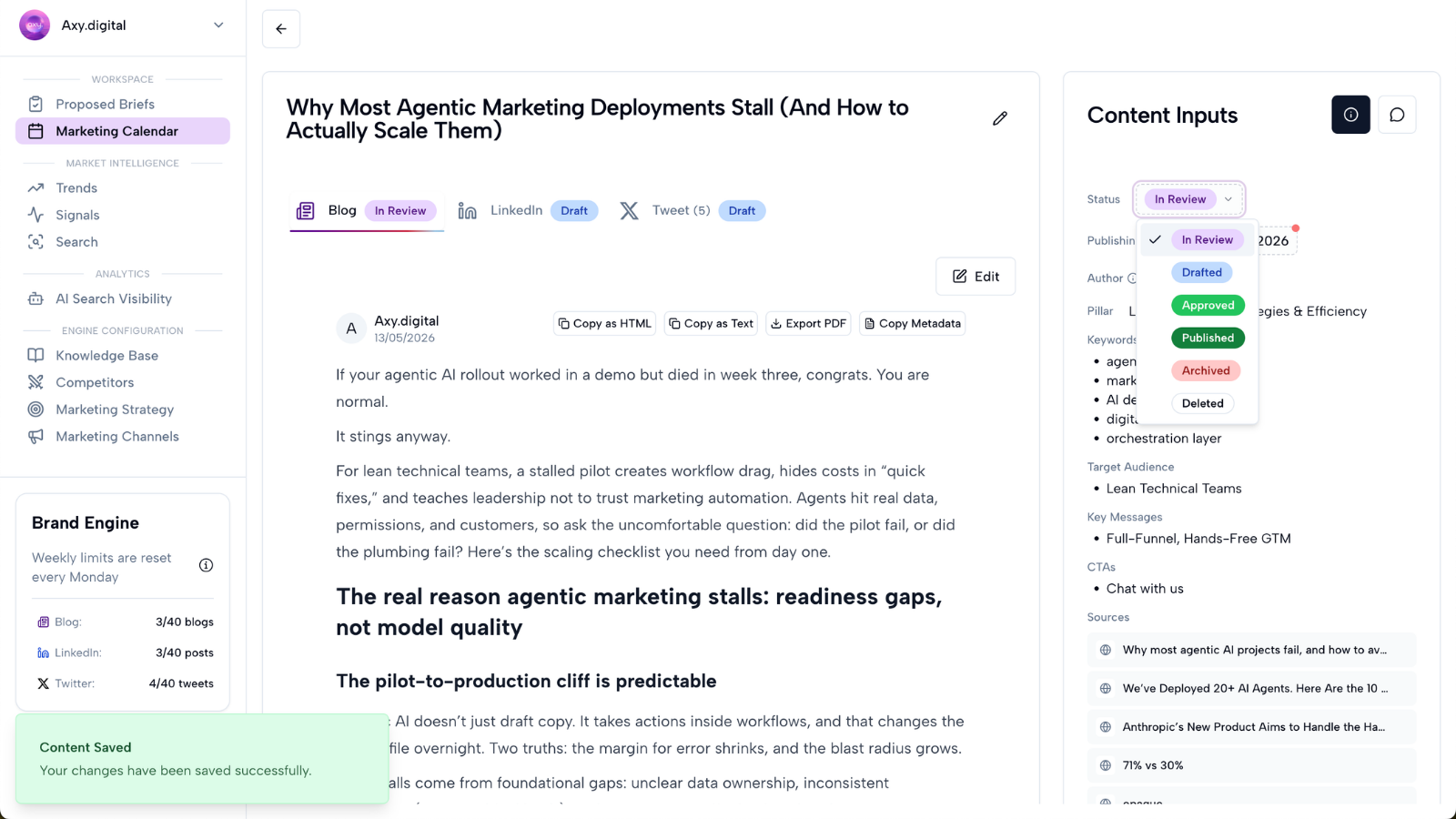
Step 7: Approve, schedule, or publish
From the marketing calendar, you can review campaign assets and decide what happens next. Depending on your setup, you may:
- Approve content
- Schedule posts
- Publish content
- Export drafts
- Send content to your CMS
- Share with your team
- Save content for later
Axy.digital keeps the campaign connected to the original signal, strategy, and channel plan so you can track why it was generated and how it performs.
FAQ
Do I need to write the campaign brief myself?
No. Axy.digital generates campaign briefs automatically based on market intelligence, AI visibility gaps, search demand, competitor updates, social trends, and news headlines. You can review the proposed briefs and choose which ones to generate.
Are campaigns already optimized for each channel?
Yes. Axy.digital uses your channel-specific plans and guidelines to generate content for each channel. That means a GEO campaign will not be written the same way as a LinkedIn post or X thread. Each asset is adapted to the channel, while staying aligned with your overall strategy.
Can I edit a campaign after it is generated?
Yes. You can review and edit generated content before approving, scheduling, or publishing it. You can also update your strategy, channel plans, or guidelines later. Future campaigns will use the updated context.
Where do generated campaigns go?
Generated campaign content is populated in your Marketing Calendar. From there, you can review, approve, schedule, publish, or export the content.
Best practices
Review Proposed Briefs regularly
Axy.digital is continuously surfacing campaign opportunities. Check Proposed Briefs as part of your weekly marketing workflow.
Choose campaigns that match your current priorities
Not every campaign needs to be generated. Prioritize briefs that align with your audience, product focus, and growth goals.
Use AI visibility gaps for GEO campaigns
If Axy.digital identifies prompts where your brand is missing, generate campaigns that help close those gaps.
Use social trends for LinkedIn and X
If a topic is gaining traction socially, it may be a good fit for thought leadership, commentary, or short-form campaigns.
Review internal links before publishing
Axy.digital suggests internal links based on your website index. Check that each link is relevant and useful for the reader.
Keep your strategy and guidelines updated
The better your strategy and channel guidelines, the better your proposed briefs and generated campaigns will be.