
Core Product Tutorials
How to Update Your Marketing Strategy and Channel Plans with New Resources
Axy.digital's marketing engine improves as your context improves. When you upload new documents or add new links to your knowledge base, Axy.digital detects the new information and prompts you to regenerate your marketing strategy and channel plans. This helps the engine stay aligned with your latest positioning, products, audience, offers, proof points, and market focus. You can also toggle between previous strategy versions, such as v1, v2, and future versions, and edit strategy fields directly when you want to make manual changes.
On this page
- When to use this workflow
- Before you start
- Step 1: Open your Knowledge Base
- Step 2: Upload new documents or add new links
- Step 3: Review the detected updates
- Step 4: Regenerate your marketing strategy
- Step 5: Review the new version
- Step 6: Review updated channel plans
- Step 7: Toggle between previous versions
- Step 8: Edit fields directly
- Step 9: Approve the updated strategy and plans
- FAQ
- Best practices
When to use this workflow
Use this workflow when you have new or updated materials, such as:
- Product briefs
- Sales decks
- Pitch decks
- Whitepapers
- Case studies
- Customer research
- Market research
- Brand guidelines
- Positioning docs
- Messaging documents
- Pricing updates
- Website pages
- Blog posts
- Documentation pages
- GitHub links
- Help center articles
- Partnership announcements
- Product launch materials
This is especially useful when your company's positioning, audience, product, or GTM strategy has changed.
Before you start
Make sure you have:
- Completed onboarding
- Approved your current marketing strategy
- Reviewed your current channel plans
- Prepared the new documents or links you want to add
Your new resources do not need to be perfect. Axy.digital will use them as additional context and suggest updates where relevant.
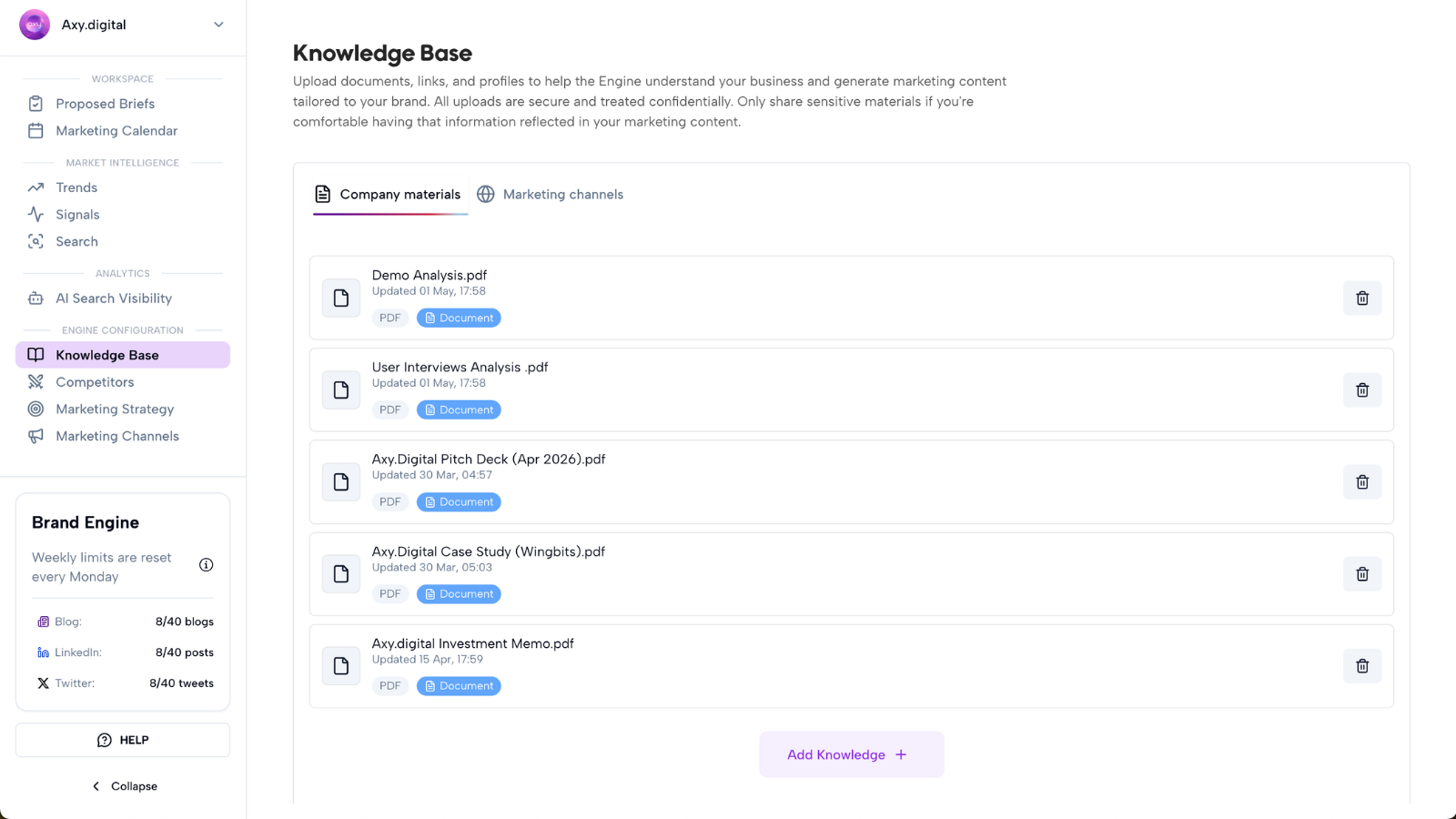
Step 1: Open your Knowledge Base
Go to your workspace and open Knowledge Base.
This is where Axy.digital stores the documents, links, and resources it uses to understand your business.
Your knowledge base can include:
- Uploaded files
- Website pages
- Online resources
- Product docs
- Sales materials
- Brand documents
- Case studies
- Technical docs
- Market research
- Customer proof
Axy.digital uses this context across your strategy, channel plans, proposed briefs, campaigns, and generated content.
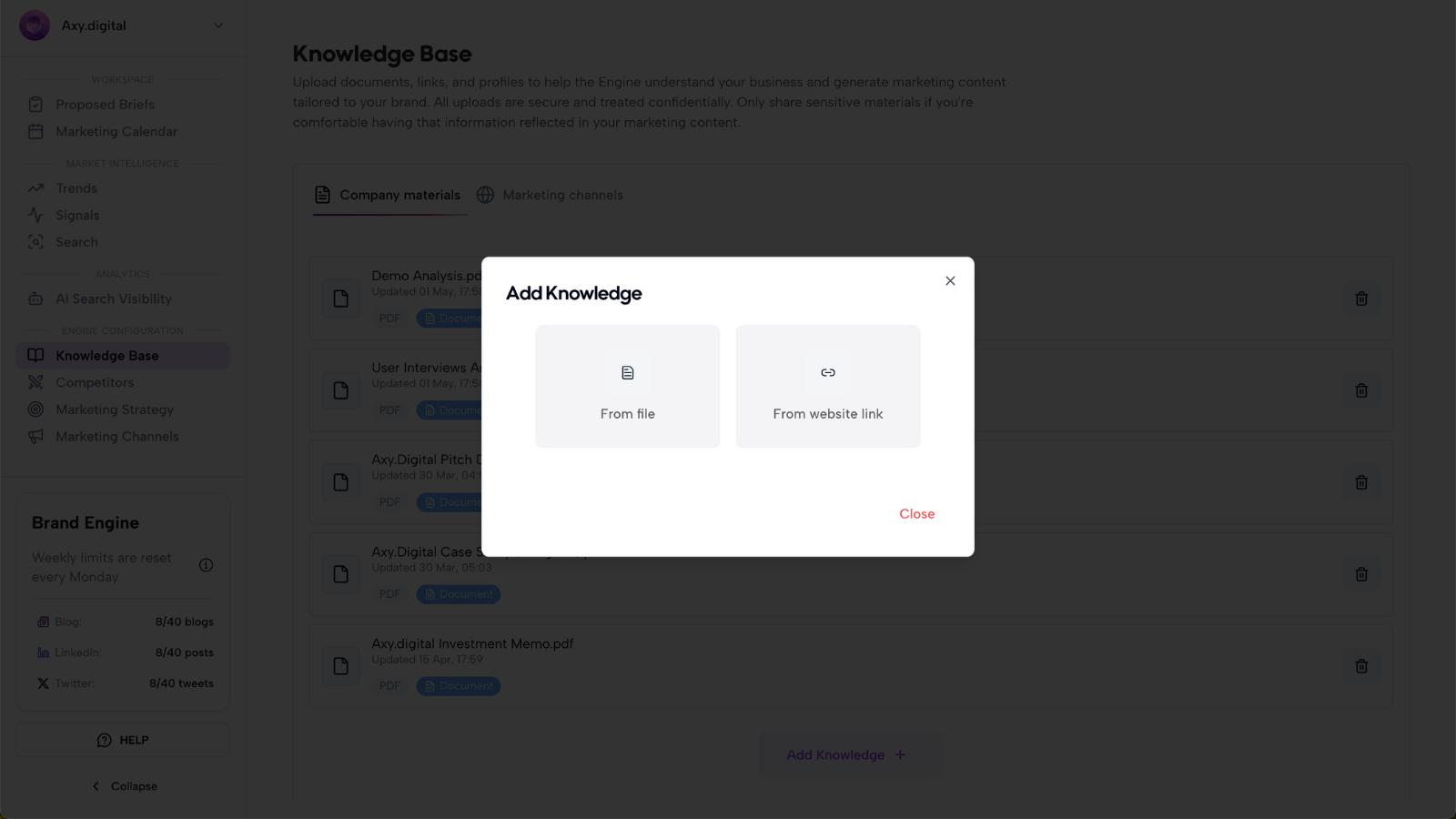
Step 2: Upload new documents or add new links
Add the new materials you want Axy.digital to learn from.
You can upload documents or add URLs such as:
- Product page links
- Docs pages
- Blog posts
- Case studies
- Whitepapers
- GitHub repositories
- Sales decks
- Product briefs
- Research reports
- Brand guidelines
- Partnership pages
After you add new resources, Axy.digital analyzes them and updates the knowledge base.
Step 3: Review the detected updates
When Axy.digital detects new documents or links, it identifies that your knowledge base has changed.
Axy.digital then prompts you to regenerate your marketing strategy and channel plans.
This prompt appears because the new materials may affect:
- Positioning
- Target audience
- Pain points
- Value proposition
- Product messaging
- Proof points
- Content pillars
- Geographic focus
- Channel priorities
- GEO plan
- LinkedIn plan
- X plan
- Custom guidelines
You can choose to regenerate the strategy immediately or review the new resources first.
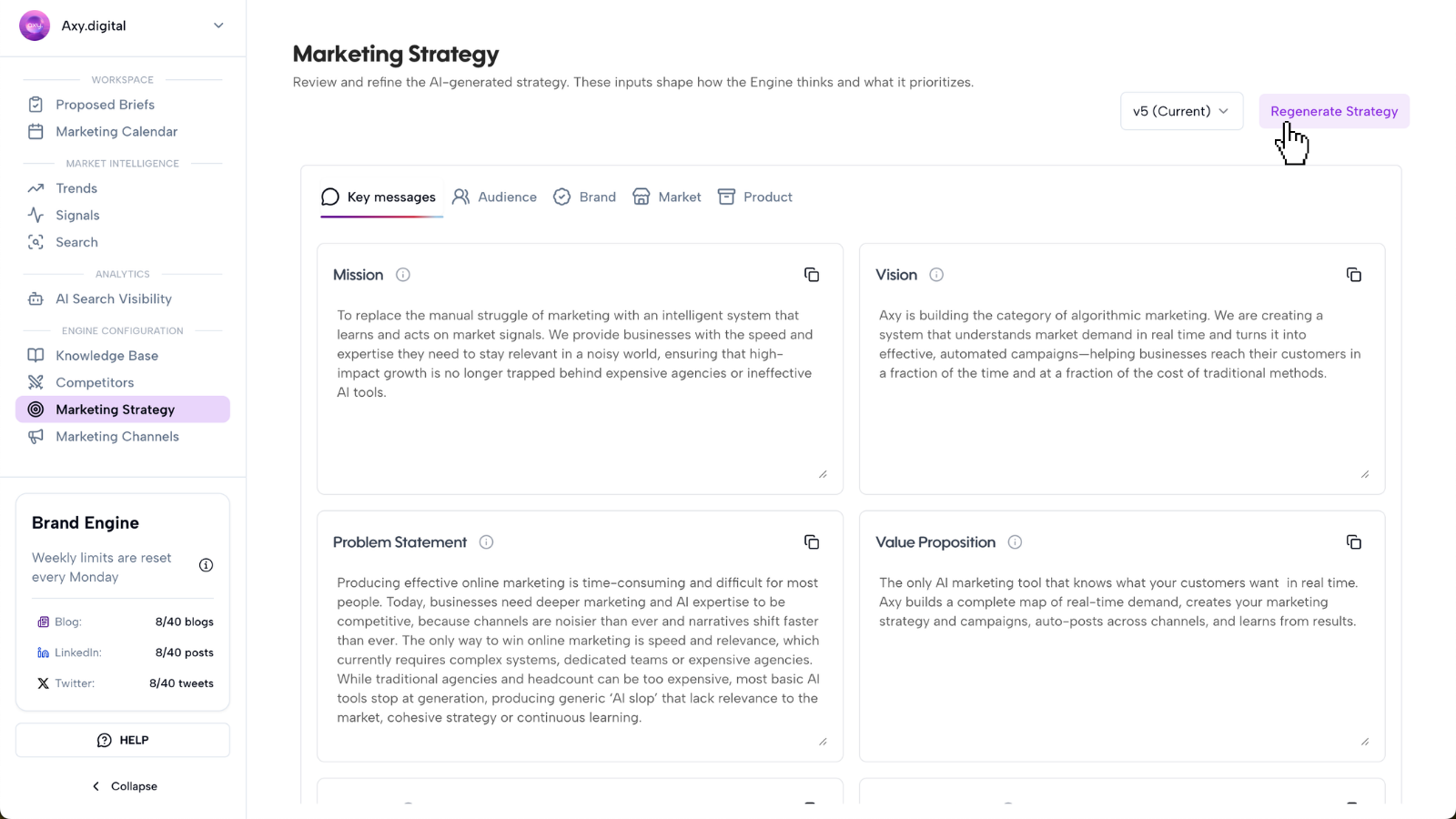
Step 4: Regenerate your marketing strategy
When you regenerate your marketing strategy, Axy.digital creates a new version based on your updated knowledge base.
The regenerated strategy uses:
- Existing approved strategy
- Newly uploaded documents
- Newly added links
- Website context
- Social context
- Competitor context
- Product information
- Previous campaign context
This helps Axy.digital update your engine without forcing you to rebuild everything manually.
For example, if you upload a new product brief, Axy.digital can update your product messaging, content pillars, CTAs, and campaign priorities.
If you add a new case study, Axy.digital can add proof points and improve future campaign recommendations.
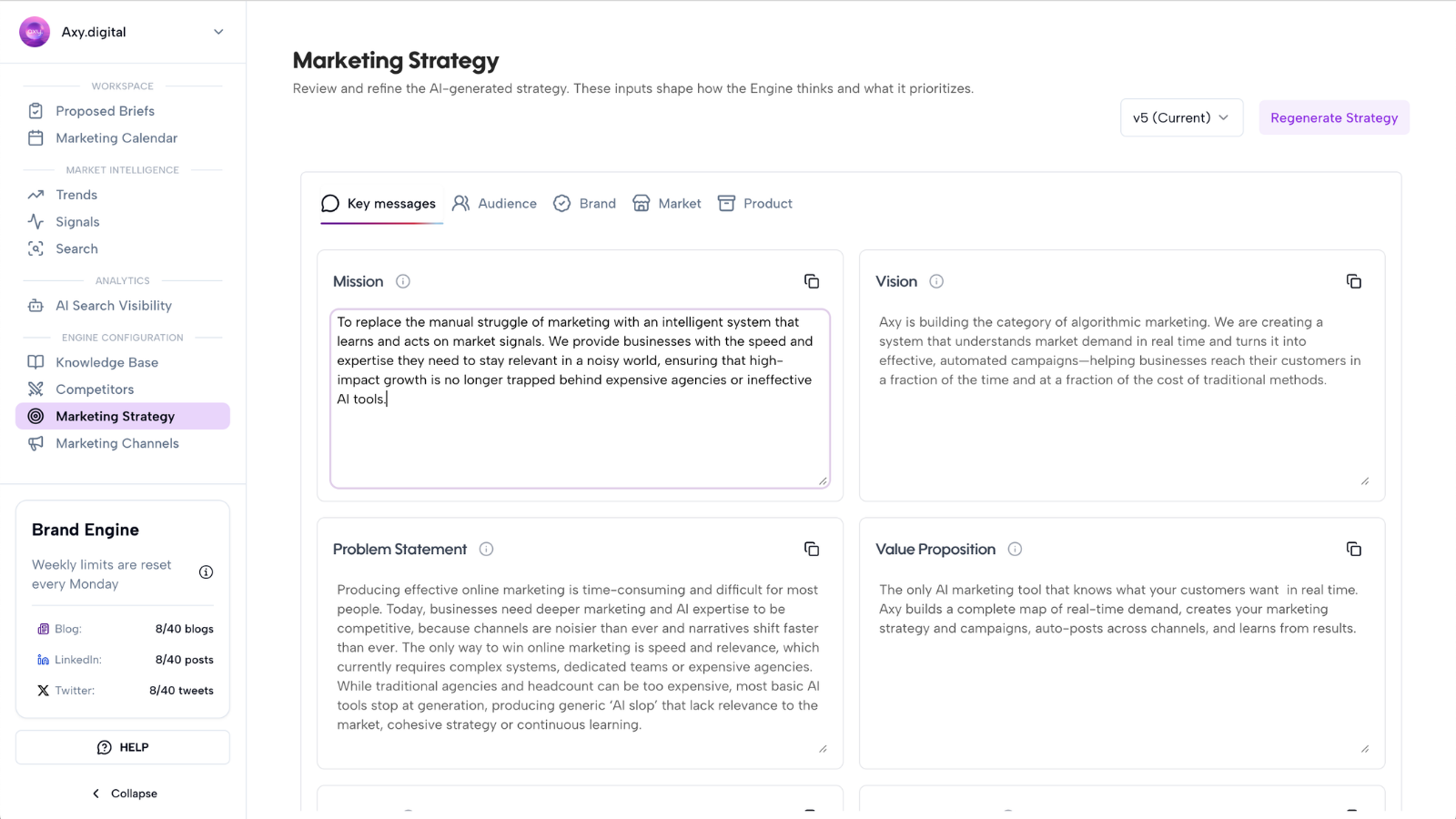
Step 5: Review the new version
After regeneration, review the new version of your strategy.
Check whether Axy.digital updated the right fields, such as:
- Vision
- Mission
- Problem statement
- Value proposition
- Taglines
- CTAs
- Marketing goals
- Target audience
- Pain points
- Industries
- Verticals
- Brand positioning
- Tone
- Personality
Make sure the new version reflects the latest information without introducing anything inaccurate.
Step 6: Review updated channel plans
Axy.digital also updates your channel plans where the new resources affect channel strategy.
Review plans for:
- GEO / AEO / SEO
- X
Check whether the updated channel plans reflect:
- New product priorities
- New audience segments
- New content pillars
- Updated proof points
- Updated CTAs
- New market focus
- New topics to prioritize
- New topics to avoid
- New language or geography settings
- Updated custom guidelines
The goal is to make sure each channel translates the updated strategy correctly.
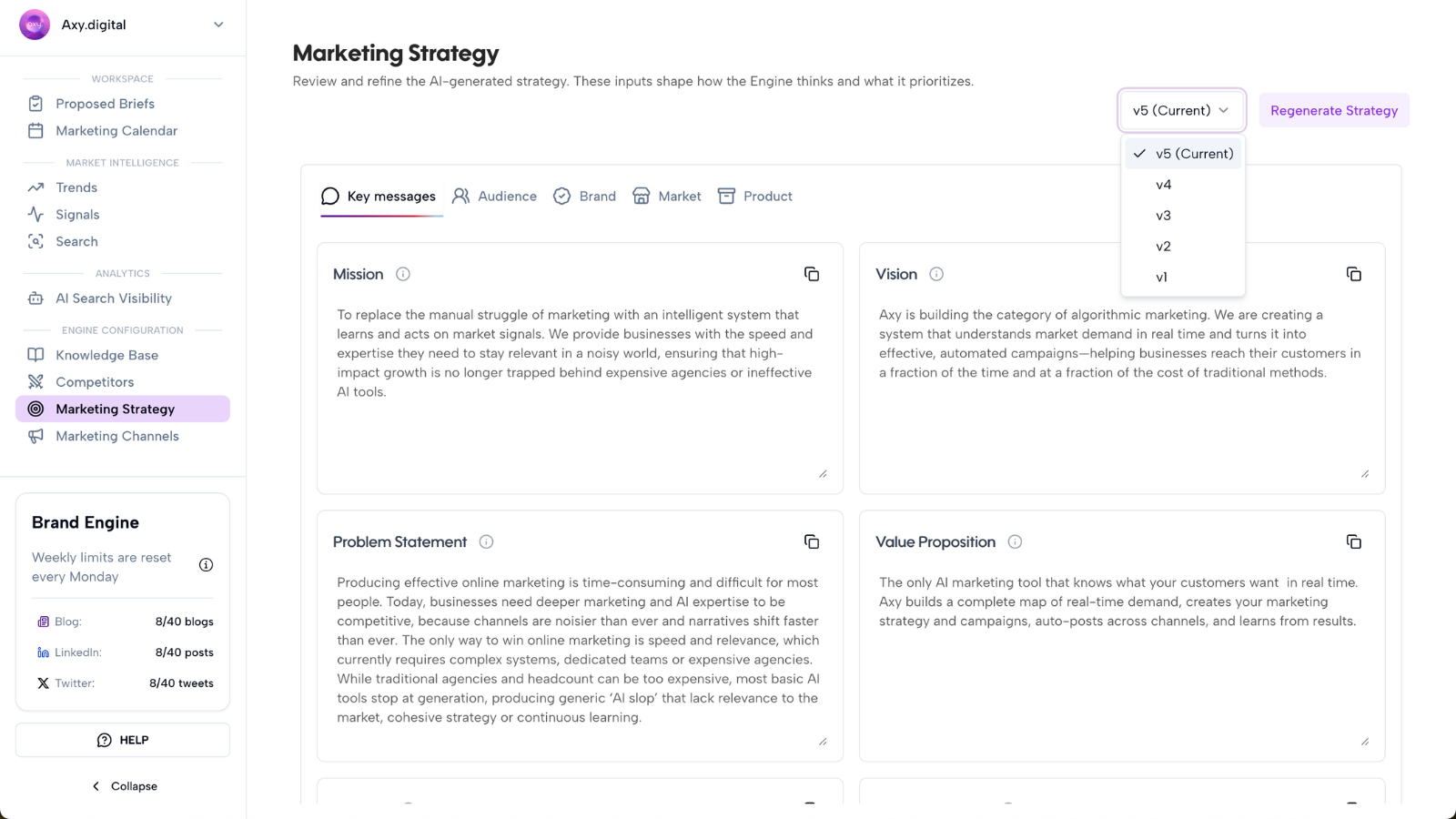
Step 7: Toggle between previous versions
Axy.digital keeps previous versions of your strategy, such as:
- v1
- v2
- v3
You can toggle between versions to compare what changed.
Use version history to:
- Review previous positioning
- Compare old and new strategy fields
- Check whether a regenerated version improved the strategy
- Restore or reference earlier language
- Understand how your engine has evolved over time
This is useful when your team wants to track how messaging, audience, or product focus has changed.
Step 8: Edit fields directly
You do not need to accept everything Axy.digital generates.
You can edit fields directly in your marketing strategy and channel plans.
Use manual edits when you want to:
- Tighten positioning
- Correct product details
- Add a missing audience
- Remove inaccurate claims
- Adjust tone
- Update CTAs
- Add words to avoid
- Change channel guidelines
- Clarify geographic focus
- Change language instructions
- Add or remove content pillars
Direct edits update the context Axy.digital uses for future briefs, campaigns, and generated content.
Step 9: Approve the updated strategy and plans
Once the updated strategy and channel plans look right, approve them.
Axy.digital will use the approved version across the engine.
Future outputs will reflect the updated context, including:
- Market intelligence recommendations
- Proposed briefs
- GEO articles
- LinkedIn posts
- X posts and threads
- Custom campaigns
- Internal link suggestions
- Marketing calendar content
This keeps the entire engine aligned with your latest business context.
FAQ
What happens when I upload new documents or links?
Axy.digital analyzes the new resources and adds them to your knowledge base. When new context is detected, Axy.digital prompts you to regenerate your marketing strategy and channel plans.
Do I have to regenerate my strategy every time?
No. You can choose when to regenerate. If the new materials affect your positioning, audience, product, or campaign direction, regenerating is usually useful.
Can I compare old and new strategy versions?
Yes. You can toggle between previous versions, such as v1, v2, and future versions, to compare how your strategy has changed.
Can I edit the strategy manually?
Yes. You can edit strategy and channel plan fields directly. Manual edits update the context Axy.digital uses for future outputs.
Will updated strategy affect future campaigns?
Yes. Once approved, the updated strategy and channel plans affect future proposed briefs, generated content, internal links, and campaign recommendations.
Will old campaigns change automatically?
No. Updating your strategy affects future outputs. Existing drafts or published campaigns should be reviewed separately if you want them to reflect the new strategy.
Best practices
Upload new resources when strategy changes
Add new docs whenever your product, positioning, audience, pricing, proof points, or market focus changes.
Regenerate after major updates
If you upload a product brief, new deck, case study, or positioning doc, regenerate your strategy so Axy.digital can update the engine.
Compare versions before approving
Use version history to make sure the new version improves the strategy.
Edit directly when needed
Axy.digital gives you a strong draft, but you can always manually refine fields.
Keep channel plans aligned
After regenerating the main strategy, review GEO, LinkedIn, and X plans to make sure each channel reflects the update correctly.