
Getting Started
How to Review and Edit Your Marketing Strategy and Channel Plans
After Axy.digital analyzes your website, social channels, online resources, uploaded documents, and competitors, it automatically generates your marketing strategy and channel-specific plans. These plans guide how Axy.digital creates future dashboards, campaign recommendations, GEO content, LinkedIn posts, and X content. You do not need to write your strategy from scratch. Axy.digital generates the first version for you. Your job is to review, adjust, and approve it.
On this page
Why this matters
Axy.digital is not a generic AI writing tool. It uses your approved strategy, brand context, website index, competitor list, and channel plans to guide future outputs, including:
- Market intelligence recommendations
- AI visibility opportunities
- GEO, AEO, and SEO content
- LinkedIn posts
- X posts and threads
- Campaign strategy
- Competitor positioning
- Internal linking recommendations
- Content tone and style
The better your context, the more relevant your campaigns become.
Before you start
Make sure you have already:
- Added your website
- Reviewed discovered social channels
- Added relevant online resources
- Uploaded key documents where needed
- Reviewed your generated company profile
- Selected your competitors
Axy.digital uses this information to generate your strategy and plans.
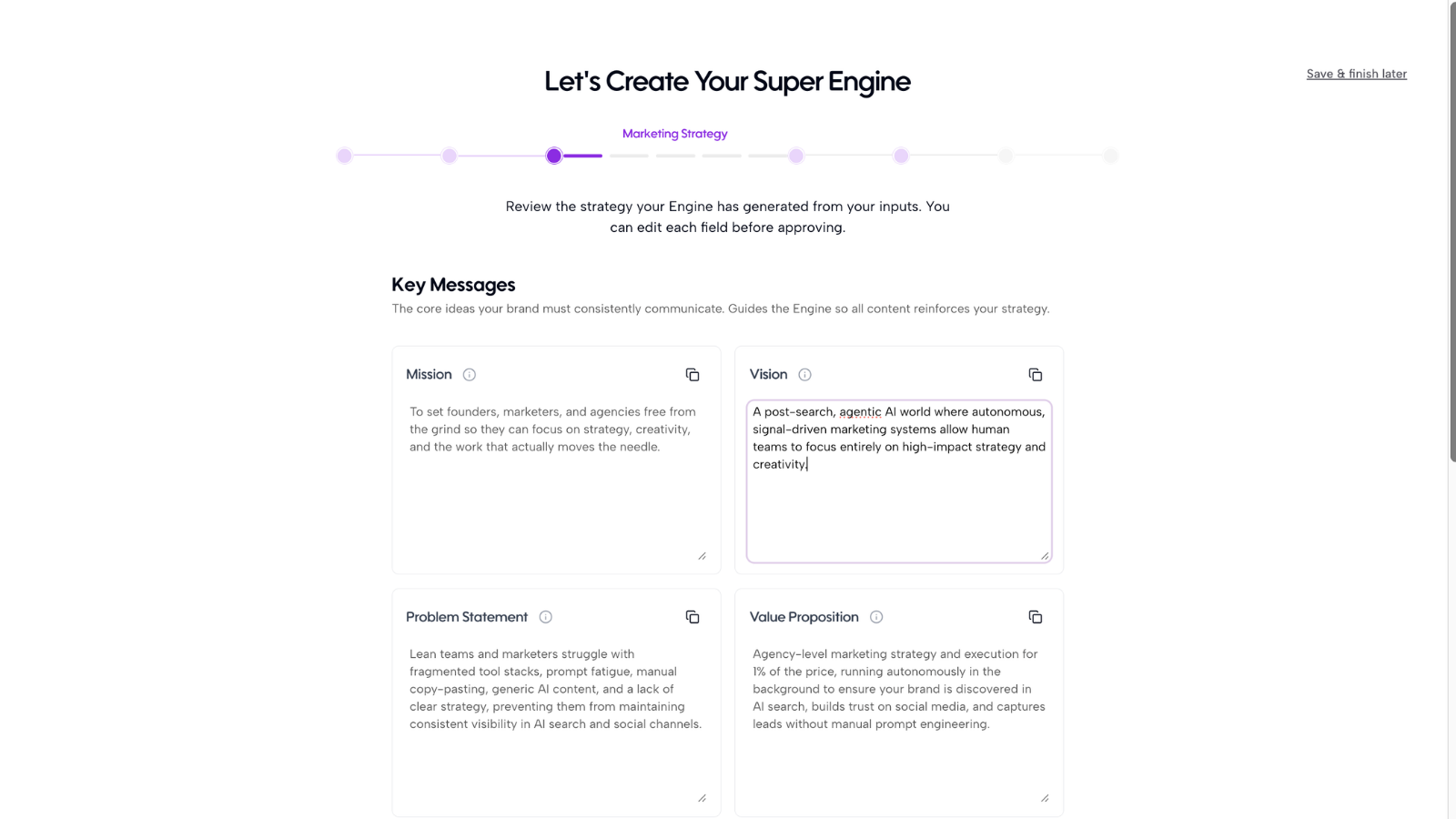
Step 1: Open your generated marketing strategy
Once your knowledge base is populated, Axy.digital will generate your marketing strategy automatically. This may include:
- Vision
- Mission
- Problem statement
- Value proposition
- Taglines
- CTAs
- Marketing goals
- Target audience
- Pain points
- Industries
- Verticals
- Brand positioning
- Tone
- Personality
Open the strategy review page and read through each section.
Step 2: Review your strategy
Your marketing strategy explains what your company does, who it serves, and why it is different. Check whether the generated strategy clearly explains:
- What your product or service is
- Who your ideal customers are
- What problem you solve
- Why your approach is different
- What category you want to own
- What outcomes customers get
Edit anything that feels too generic, too broad, inaccurate, or outdated. Your strategy becomes one of the key inputs Axy.digital uses when deciding how to frame campaigns, product pages, comparison content, LinkedIn posts, and X commentary.
Step 3: Review your channel plans
Axy.digital generates channel-specific plans for:
- GEO / AEO / SEO
- X
Each plan translates your overall strategy into a channel-specific execution plan. Review the content pillars in each channel plan. These help Axy.digital understand the themes your brand should own. Examples include:
- AI visibility
- Market intelligence
- Founder-led growth
- Cybersecurity risk
- Legal compliance
- Real estate market trends
- Supply chain resilience
- Wellness education
- Product comparisons
- Customer education
Remove themes that are not relevant. Add themes you want Axy.digital to prioritize. These pillars influence future GEO content, LinkedIn posts, X threads, comparison pages, tutorials, and cross-channel campaigns.
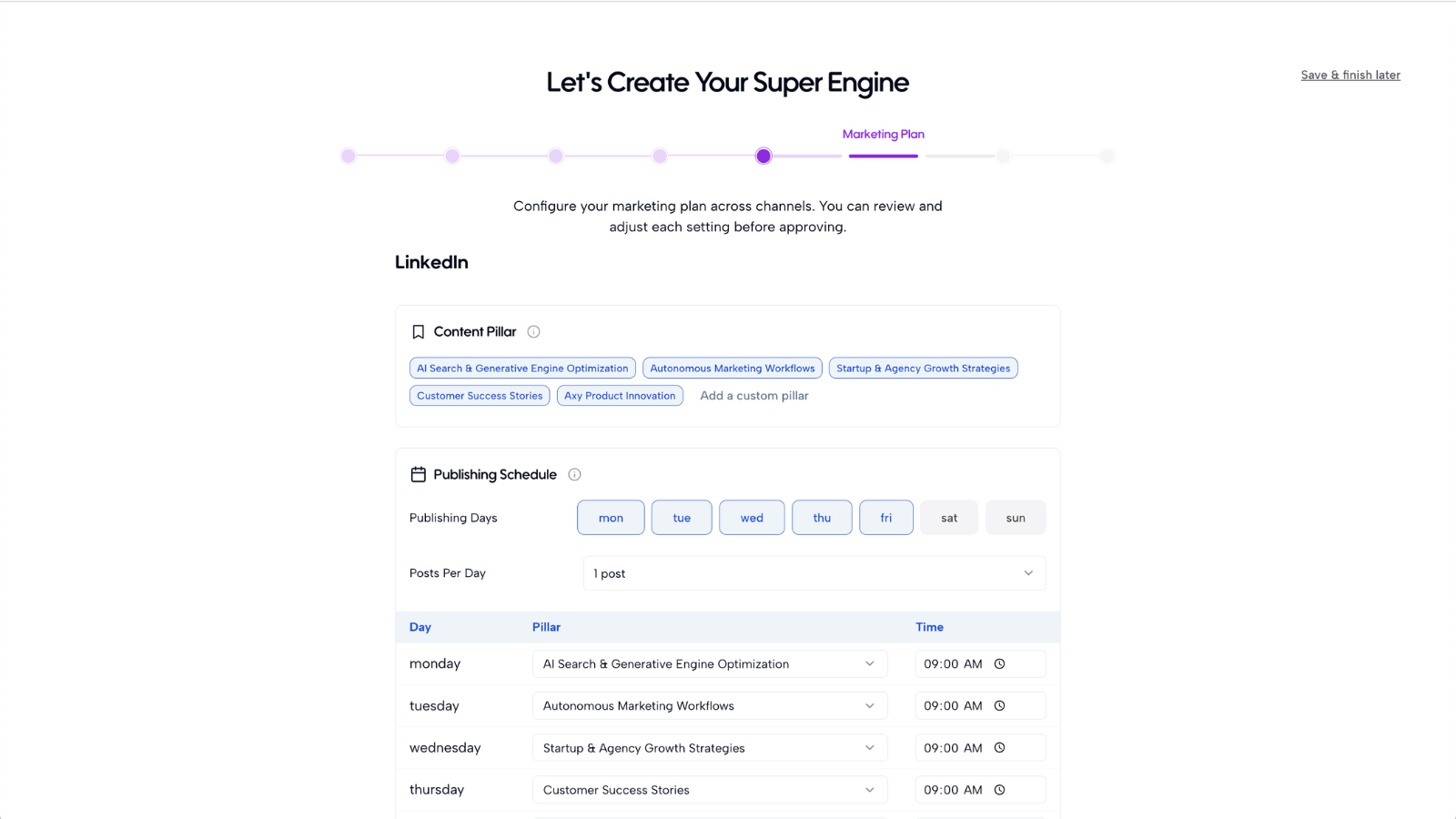
Step 4: Review each channel plan in detail
GEO / AEO / SEO plan
This plan guides how Axy.digital creates content for Google, answer engines, and AI search. Review whether it includes the right:
- Search themes
- Prompt clusters
- Customer questions
- Target topics
- Product pages to support
- Use-case opportunities
- Comparison opportunities
- Internal linking priorities
- Content formats
- Geographic or industry focus
Because Axy.digital indexes your website pages, it can suggest internal links from future GEO content to relevant product pages, use-case pages, tutorials, case studies, and comparison pages.
LinkedIn plan
This plan guides how Axy.digital creates LinkedIn content for your founder profile, company page, or team accounts. Review whether it reflects:
- Your target audience on LinkedIn
- Founder voice
- Company voice
- Thought leadership themes
- Product education themes
- Market commentary angles
- Content formats
- Posting style
- CTA preferences
- Topics to avoid
A strong LinkedIn plan helps Axy.digital turn market signals into content that feels timely, relevant, and aligned with your point of view.
X plan
This plan guides how Axy.digital creates faster-moving commentary, posts, and threads. Review whether it reflects:
- Your target audience on X
- Topics your market discusses there
- Founder or brand voice
- Short-form content style
- Thread opportunities
- Community or ecosystem narratives
- Product update formats
- Commentary angles
- Topics to avoid
X moves quickly, so this plan helps Axy.digital decide which signals are worth turning into short-form content and which ones to ignore.
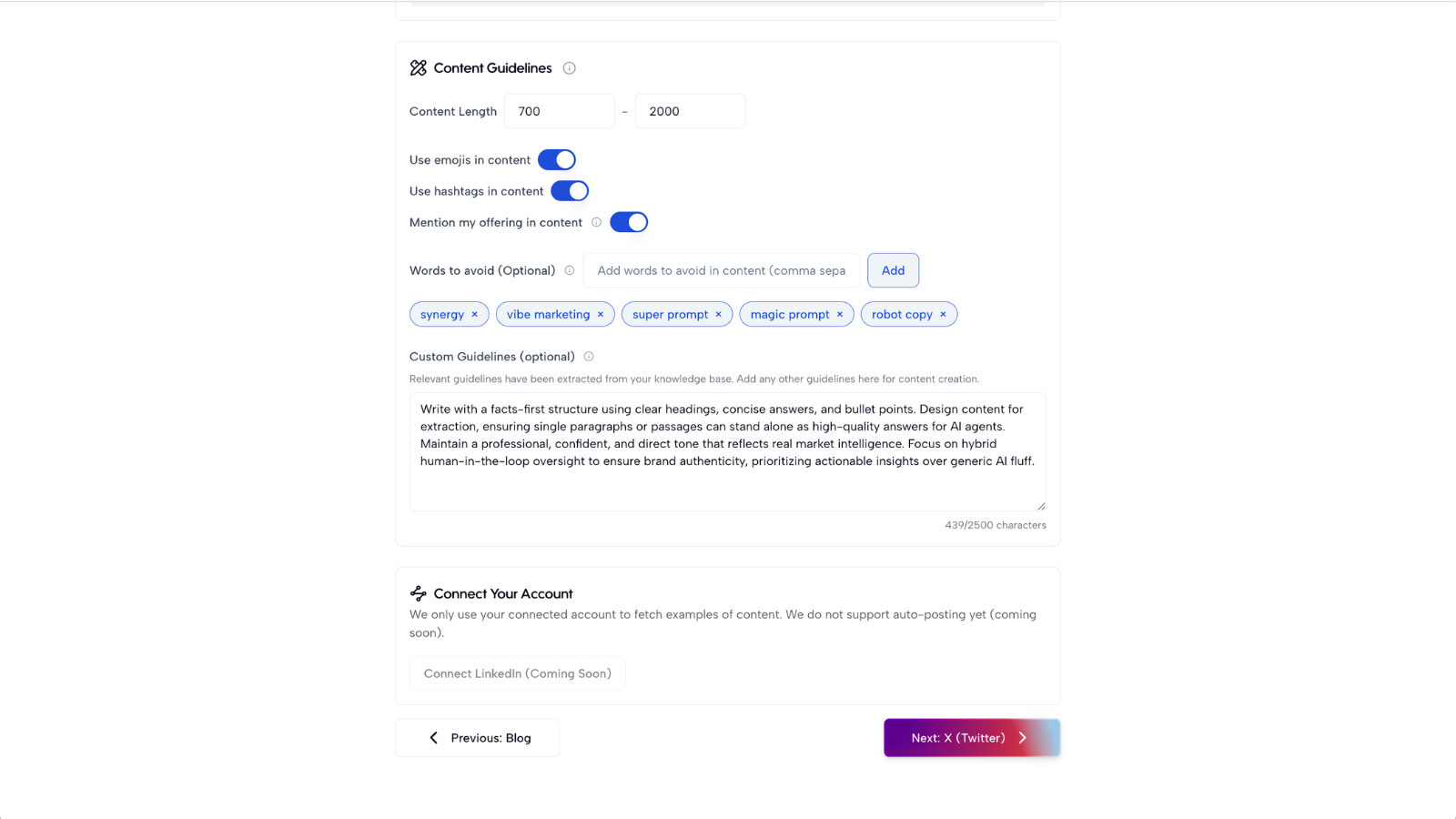
Step 5: Configure channel guidelines
Axy.digital lets you set guidelines for each channel so generated content fits the way you want to show up. You can configure guidelines for GEO / AEO / SEO, LinkedIn, and X. For each channel, review or add preferences such as:
- Preferred post or article length
- Writing style
- Tone of voice
- Words or phrases to avoid
- CTA preferences
- Formatting preferences
- Topics to prioritize
- Topics to avoid
- Level of technical depth
- Use of emojis
- Use of hashtags
- Use of first-person voice
- Whether content should be founder-led, brand-led, educational, opinionated, or product-led
For example, your LinkedIn guidelines might say: Write in a direct, founder-led voice. Keep posts between 120–180 words. Avoid hype, em dashes, and generic AI phrases like “game-changing” or “revolutionary.” Use clear hooks, short paragraphs, and practical takeaways.
Your X guidelines might say: Keep posts sharp and concise. Avoid corporate language. Prioritize timely commentary, contrarian angles, and short threads. Do not overuse hashtags.
Your GEO guidelines might say: Write clear, citation-worthy articles with structured headings, FAQs, internal links, and direct answers to high-intent questions. Avoid vague thought leadership and unsupported claims.
You can update channel guidelines anytime. When you change them, future GEO content, LinkedIn posts, and X posts will follow the updated preferences.
Step 6: Approve your strategy and plans
Once your marketing strategy and channel plans are directionally accurate, approve them. Axy.digital will use the approved strategy and plans across the engine. You can still edit them later. When you update your strategy or plans, Axy.digital uses that updated context to improve future dashboards, recommendations, internal linking, and campaigns.
FAQ
Does everything need to be perfect?
No. Your strategy and channel plans do not need to be perfect to start using Axy.digital. They only need to be accurate enough for the engine to generate useful recommendations and content. You can come back later to refine positioning, ICP, voice, competitors, content pillars, channel plans, product details, market focus, uploaded resources, and website context. Axy.digital is designed to improve as your context improves.
What happens when I edit the strategy later?
When you edit your marketing strategy or channel plans, those updates affect the entire engine. Future market intelligence, AI visibility recommendations, GEO articles, LinkedIn posts, X threads, and internal link suggestions will use the updated context. Your strategy should be treated as a living input, not a one-time setup task.
How do channel plans differ from the main strategy?
Your main marketing strategy defines the overall direction. Your channel plans explain how that strategy should be translated into specific channels. The GEO plan focuses on search, AI discovery, prompt clusters, and internal linking. The LinkedIn plan focuses on thought leadership, audience education, and professional credibility. The X plan focuses on fast-moving commentary, ecosystem narratives, and short-form visibility. Together, they help Axy.digital generate content that fits each channel while staying aligned with your overall strategy.
Best practices
Review for direction, not perfection
Get the strategy and plans directionally right first. You can refine them later.
Be specific about your audience
“B2B companies” is less useful than “seed-stage cybersecurity startups selling to CISOs.”
Add strong differentiation
If your product is faster, cheaper, more automated, more secure, or more specialized, make that clear.
Define what not to say
Words and phrases to avoid help Axy.digital stay on-brand and avoid generic AI output.
Keep your strategy current
When your messaging changes, update it in Axy.digital so future campaigns reflect the new direction.
Review internal link suggestions before publishing
Axy.digital can recommend internal links based on your website index and strategy. Review them before publishing to make sure they are accurate and useful.
Once your marketing strategy and channel plans are approved, your Engine is ready for core product workflows.
Recommended next