
Getting Started
How to Add Your Competitors
Competitors help Axy.digital understand your market. During onboarding, Axy.digital automatically suggests competitors based on your website, positioning, category, online presence, and market context. You can review the suggestions, select the most relevant companies, remove irrelevant ones, and add missing competitors manually. Your selected competitors influence market intelligence, AI visibility analytics, GEO content, LinkedIn campaigns, X campaigns, comparison content, internal linking recommendations, and future campaign strategy.
On this page
Why competitors matter
Axy.digital uses competitor context to understand:
- Who your buyers compare you against
- Which brands are visible in your category
- What narratives competitors are using
- What content they publish
- Which competitors show up in AI search
- Which prompts or topics your brand is missing from
- Which comparison pages or content gaps may be worth creating
- Where you have positioning opportunities
The goal is not to track every company in your space. The goal is to select the competitors that matter most to your buyers, market, and growth strategy.
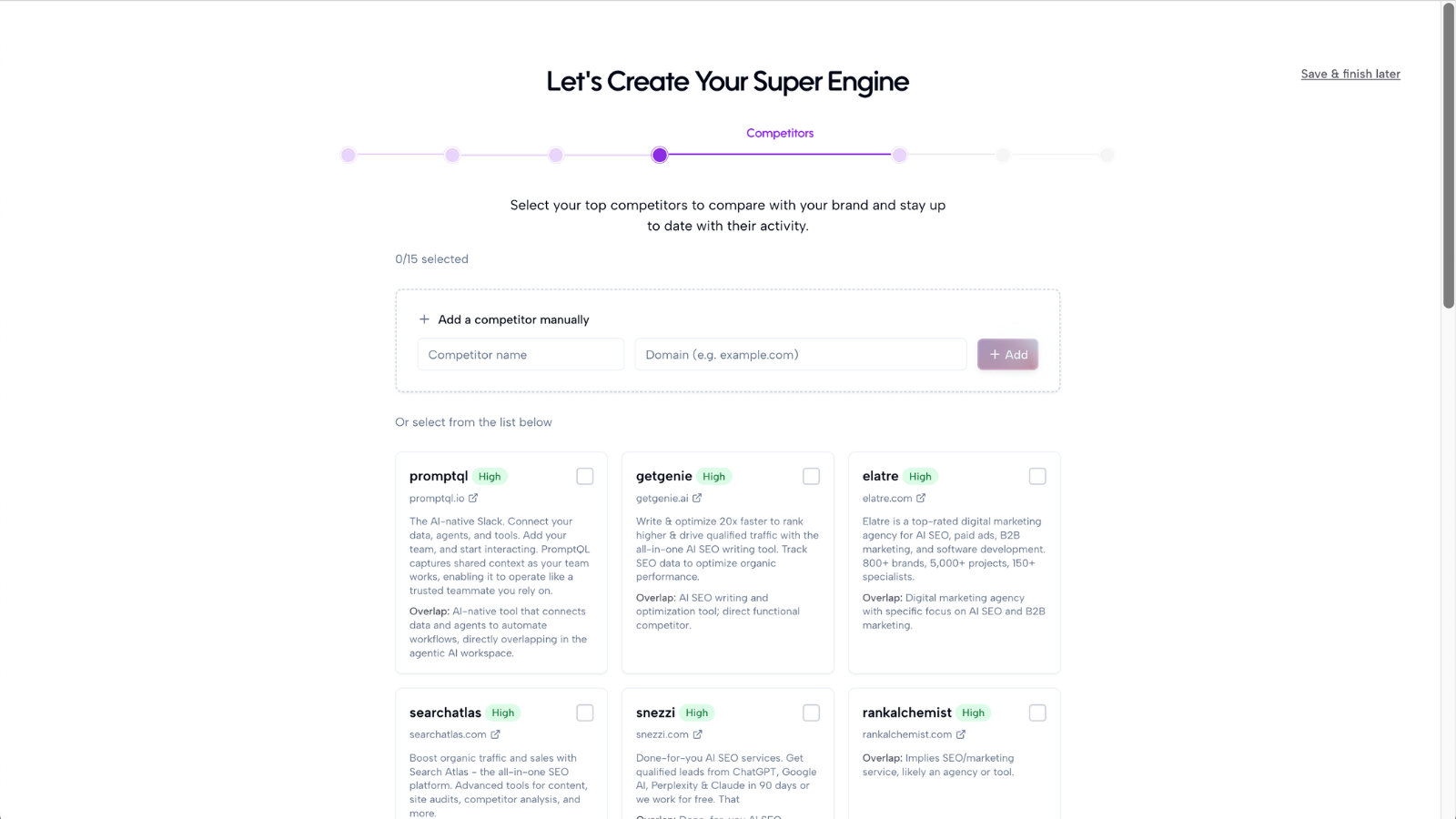
Step 1: Review Axy.digital’s suggested competitors
After Axy.digital analyzes your website, company profile, social presence, and market category, it will suggest competitors. These suggestions may be based on:
- Your category
- Your product description
- Your target audience
- Your website content
- Your positioning
- Search and market context
- AI search visibility patterns
- Similar companies in your space
Review each suggested competitor carefully.
Step 2: Select the most relevant competitors
Choose competitors that your customers are most likely to compare you against. Good competitors usually include:
- Companies with a similar product or service
- Companies targeting the same audience
- Companies showing up in search for your category
- Companies mentioned in AI answers for your market
- Companies your sales team hears about often
- Companies your prospects ask about
- Companies you want to compete with in positioning or visibility
Avoid selecting competitors just because they are well-known if they are not relevant to your buyer journey. A focused competitor list will usually produce better market intelligence than a broad, unfocused one. No need to remove irrelevant competitors.
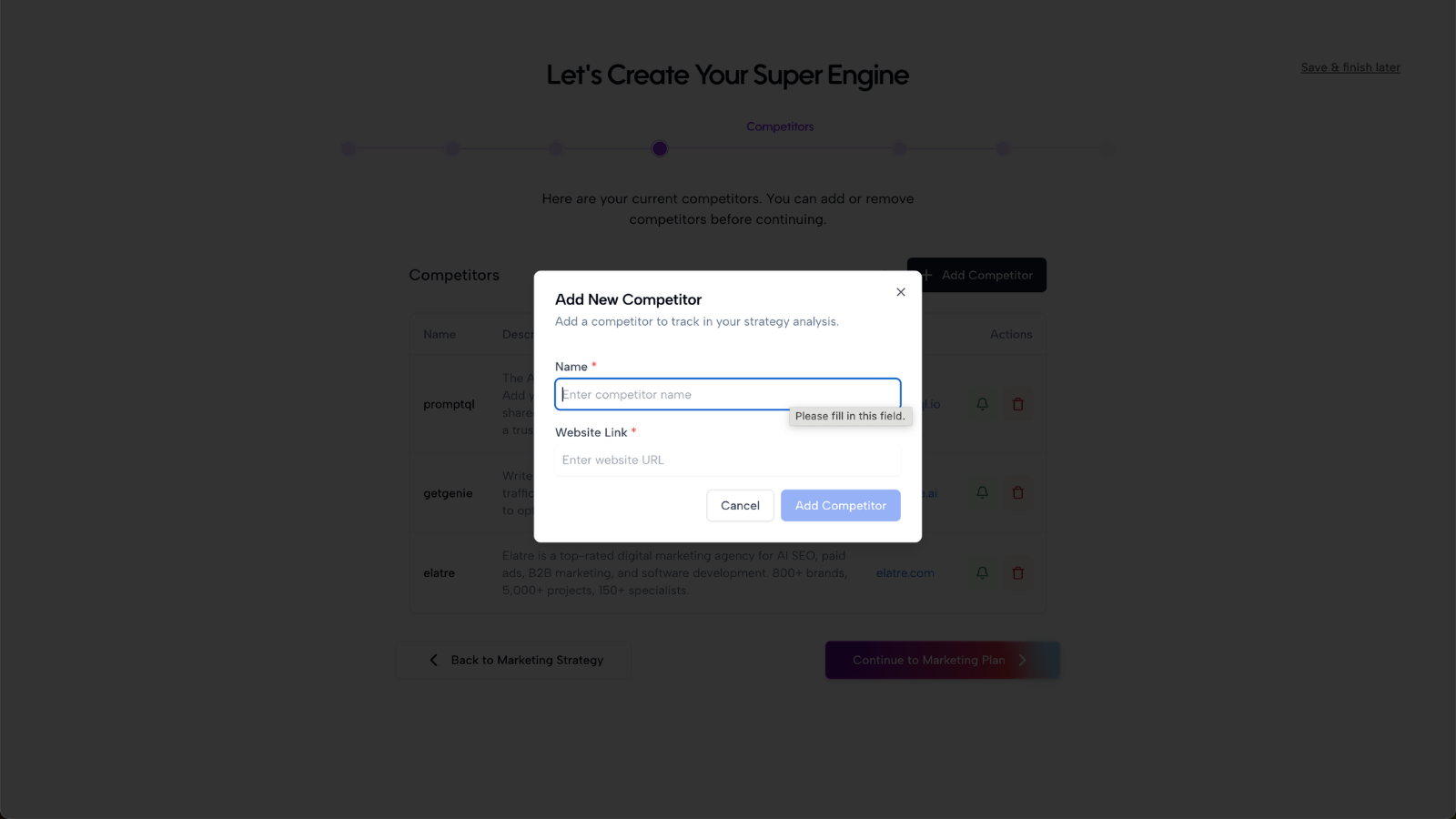
Step 3: Add missing competitors manually
If Axy.digital misses an important competitor, add it manually. You may want to add:
- Direct product competitors
- Category leaders
- Regional competitors
- Emerging startups
- Companies your customers mention
- Companies you want to displace in AI search
- Companies ranking for your target topics
- Companies you plan to compare against in future content
For each competitor, add the company name and website URL if available.
Step 4: Approve your competitor list
Once your competitor list looks accurate, approve it. Axy.digital will use this competitor context across the engine, including:
- Market intelligence dashboards
- Competitor content monitoring
- AI visibility analytics
- Prompt-level competitor comparison
- GEO content opportunities
- LinkedIn campaign ideas
- X content angles
- Positioning recommendations
- Comparison page opportunities
- Internal linking suggestions for relevant content
Competitor context helps Axy.digital understand not just what your company says, but how your market is framed by others.
Step 5: Use competitors to inform content architecture
Axy.digital can use your competitor list to identify topics, prompts, and pages that may be worth creating. For example, competitor context can help reveal opportunities for:
- Comparison pages
- Alternative pages
- Category pages
- Use-case pages
- GEO articles
- AI visibility campaigns
- LinkedIn positioning posts
- X commentary
Because Axy.digital also indexes your website pages, it can later suggest internal links between new competitor-related content and your existing product, use-case, tutorial, and case study pages. For example, if Axy.digital generates a comparison campaign, it may suggest internal links to:
- A relevant product page
- A related use-case page
- A tutorial explaining the workflow
- A case study that supports the claim
- Another comparison page in the same category
This helps competitor content become part of a connected website system.
Step 6: Update competitors over time
Your competitor list is not fixed. As your company evolves, you may want to add or remove competitors. For example, update your competitor list when:
- You enter a new market
- Your ICP changes
- A new competitor launches
- Your sales team starts hearing a new name
- You expand into a new region
- Your positioning changes
- You want to track a new category
- AI search starts recommending a new company in your space
Updating competitors helps Axy.digital keep your market intelligence and campaigns relevant.
FAQ
How many competitors should I add?
Start with a focused list. For most teams, 5–10 strong competitors is a good starting point. You can add more later, but the first list should prioritize relevance over quantity.
Should I include aspirational competitors?
Yes, but only if they are useful. Aspirational competitors can help Axy.digital understand the category you want to be associated with. But your list should still include the companies your buyers actually compare you against today. A good competitor mix may include direct competitors, category leaders, regional competitors, emerging competitors, and aspirational competitors.
Do competitors affect internal linking?
Indirectly, yes. Your competitor list helps Axy.digital understand which comparison topics, category narratives, and positioning gaps matter. Your website index helps Axy.digital understand which existing pages should be linked when those campaigns are created. Together, competitor context and website indexing help Axy.digital generate campaigns that are more strategically connected.
Best practices
Choose buyer-relevant competitors
Ask: “Would my customer compare us to this company?” If yes, include it.
Keep the list focused
Too many irrelevant competitors can weaken the signal quality.
Include competitors that show up in AI search
If AI tools are recommending a company for your category, it may be worth tracking.
Include competitors your sales team hears about
Sales conversations are often one of the best indicators of real buyer comparison behavior.
Review your list regularly
Competitors change as your category evolves. Update your list when the market changes.
Once your competitors are approved, Axy.digital can use them to generate stronger AI visibility analytics, market intelligence, and campaigns.